Satisfactory Academic Progress (SAP) Calculators
Determine your progression rate, GPA and whether you have met Satisfactory Academic Progress
Financial Aid
SAP Calculator
Use these calculators to estimate your rate of progression and GPA. These tools help you understand where you stand and what may be needed to maintain Satisfactory Academic Progress.

1. Find your SAP numbers
Log into your YC portal and review the Satisfactory Academic Progress tab in My Financial Aid.
2. Enter earned and attempted hours
Use your total attempted hours, earned hours, and any anticipated next-semester credits.
3. Review your estimate
Your rate of progression must be at least 66.67%. YC does not round this SAP calculation.
SAP Progression Rate Calculator
Estimate how completed and anticipated credits may affect your SAP rate of progression.
Where to find your figures
- Log into your YC portal.
- Go to Students → My Financial Aid.
- Select the Satisfactory Academic Progress tab.
- Use the SAP and Program(s) of Study section.
Scenario
Sally provided a transcript to YC from her previous school before SAP was run at the end of the term. She had 20 transfer credits, but YC accepted 15 of those credits. Transfer credits count as attempted and earned.
Her Financial Aid Overview shows that she has attempted 12 credits at YC and earned 6 of those credits. She plans to enroll in a 3-credit course next semester.
| Credit type | Earned | Attempted |
|---|---|---|
| Transfer credits | 15 | 15 |
| YC credits | 6 | 12 |
| Total credits | 21 | 27 |
Calculator view:
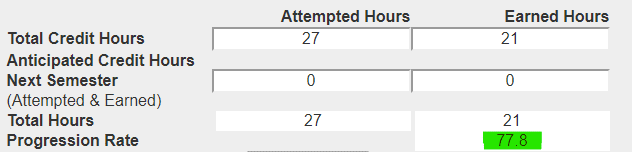
Sally's current ROP would calculate as 77.77%, which is above the SAP standard of 66.67%.
Adding anticipated credits
Sally plans to attempt and earn 3 credits next semester.
| Credit type | Earned | Attempted |
|---|---|---|
| Anticipated credits | 3 | 3 |
Calculator view:
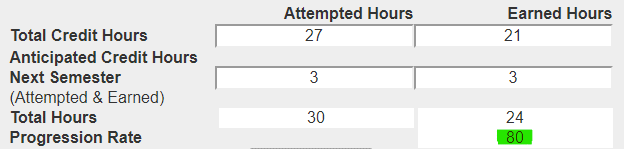
Her estimated ROP would calculate as 80%, which is above the SAP standard of 66.67%.
Estimating unearned anticipated hours
If Sally wants to estimate a worst-case scenario, she can enter 3 anticipated attempted hours and 0 anticipated earned hours.
| Credit type | Earned | Attempted |
|---|---|---|
| Anticipated credits | 0 | 3 |
Calculator view:
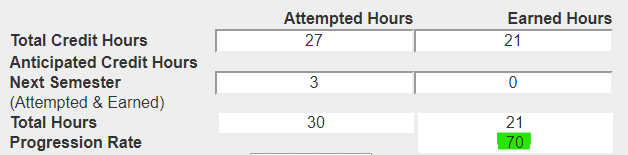
The calculator shows whether the student remains above the 66.67% minimum SAP progression standard.
GPA Calculators
Estimate your semester GPA, updated cumulative GPA, or the GPA needed to reach a goal.
Cumulative GPA Calculator
Enter up to eight classes. Add your current cumulative GPA and completed GPA credit hours from your transcript to estimate your new cumulative GPA.
Target GPA Calculator
Use this calculator to estimate the GPA you need over a future number of credit hours to reach a target cumulative GPA.